RISC-V Toolchain
Motivation
The reason for writing this post is to capture my understanding of how embedded toolchains work. I primarily work on embedded RISC-V cores, so I will explain how to get the correct RISC-V toolchain on both Windows and WSL, because these are my primary development environments.
Toolchain
A toolchain basically contains all the required tools and libraries to compile, link, and manipulate object files and binaries. It is the basic first step when starting to work with embedded systems, or with native development in general.
Installation
Here, I will list a few possible sources you can use to get or download the correct toolchain for your needs.
riscv-gnu-toolchain
Windows
Compiling the whole toolchain from source is not well documented on Windows because it requires many dependencies, including GNU/LLVM tools, which are not straightforward to set up unless you already have MinGW/MSYS2 installed on your system. Even the official riscv-gnu-toolchain README.md does not explain how to build or obtain a native Windows toolchain. In theory, you could cross-compile a Windows toolchain from another environment such as WSL, but I would recommend using one of the other sources mentioned below.
WSL
- Just follow the README.md page which explains how to compile and install.
- You can also get precompiled versions from their GitHub Releases page.
- Download the correct archive for your machine:
- RISC-V 32-bit: riscv32-elf-ubuntu-22.04-gcc.tar.xz
- RISC-V 64-bit: riscv64-elf-ubuntu-22.04-gcc.tar.xz
xPack
xPack Binary Development Tools is a cross-platform binary tools for software development, intended for reproducible builds, with an emphasis on C/C++ and embedded projects.
xPack supports many packages, but here we are interested in embedded RISC-V, so we will focus on riscv-none-elf-gcc-xpack, which is a binary distribution of the GNU RISC-V Embedded GCC toolchain. Documentation is available here.
There are two ways to install these xPack toolchains:
- A tool to automate builds, tests, and manage C/C++ dependencies, inspired by npm. For example:
$ xpm install @xpack-dev-tools/riscv-none-elf-gcc@14.2.0-3 --verbose
- Download the correct archive for your machine. For example:
Embecosm
Embecosm provides free GNU and Clang/LLVM compiler tool chain packages for the convenience of the open source software community.
There are a few different packages listed on their tool-chain-downloads page. For this use case, we want the embedded RISC-V toolchains, which means choosing either RISC-V Embedded stable release compilers or RISC-V Embedded top-of-tree compilers. I generally use the stable releases (GCC/LLVM), but you are free to choose based on your development needs.
- Download the correct archive for your machine:
- Windows: riscv32-embecosm-win64-gcc13.2.0.zip
- Linux (WSL): riscv32-embecosm-ubuntu2204-gcc13.2.0.tar.gz
Multilib Support
You may have noticed by now that I have listed two separate prebuilt versions of
riscv-gnu-toolchain: one for 32-bit and one for 64-bit. These precompiled versions do not support multilib, meaning each version only compiles for one ISA width. However, when building from source, we can enable multilib support using the--enable-multiliboption.xPackandEmbecosmsupport multilib, meaning you get a single binary that can be used to compile for both 32-bit and 64-bit ISAs.You could check which all variants a particular compiler supports by passing
--print-multi-libtogcc:$ riscv32-elf-ubuntu-22.04-gcc --print-multi-lib .;$ riscv64-elf-ubuntu-22.04-gcc --print-multi-lib .;$ riscv32-embecosm-win64-gcc13.2.0.exe --print-multi-lib .; rv32e/ilp32e;@march=rv32e@mabi=ilp32e rv32ea/ilp32e;@march=rv32ea@mabi=ilp32e rv32em/ilp32e;@march=rv32em@mabi=ilp32e rv32eac/ilp32e;@march=rv32eac@mabi=ilp32e rv32emac/ilp32e;@march=rv32emac@mabi=ilp32e rv32i/ilp32;@march=rv32i@mabi=ilp32 rv32ia/ilp32;@march=rv32ia@mabi=ilp32 rv32im/ilp32;@march=rv32im@mabi=ilp32 rv32if_zicsr/ilp32f;@march=rv32if_zicsr@mabi=ilp32f rv32ifd_zicsr/ilp32d;@march=rv32ifd_zicsr@mabi=ilp32d rv32iaf_zicsr/ilp32f;@march=rv32iaf_zicsr@mabi=ilp32f rv32iafd_zicsr/ilp32d;@march=rv32iafd_zicsr@mabi=ilp32d rv32imf_zicsr/ilp32f;@march=rv32imf_zicsr@mabi=ilp32f rv32imfd_zicsr/ilp32d;@march=rv32imfd_zicsr@mabi=ilp32d rv32iac/ilp32;@march=rv32iac@mabi=ilp32 rv32imafc_zicsr/ilp32f;@march=rv32imafc_zicsr@mabi=ilp32f rv32imafdc_zicsr/ilp32d;@march=rv32imafdc_zicsr@mabi=ilp32d rv64i/lp64;@march=rv64i@mabi=lp64 rv64ia/lp64;@march=rv64ia@mabi=lp64 rv64im/lp64;@march=rv64im@mabi=lp64 rv64if_zicsr/lp64f;@march=rv64if_zicsr@mabi=lp64f rv64ifd_zicsr/lp64d;@march=rv64ifd_zicsr@mabi=lp64d rv64iaf_zicsr/lp64f;@march=rv64iaf_zicsr@mabi=lp64f rv64iafd_zicsr/lp64d;@march=rv64iafd_zicsr@mabi=lp64d rv64imf_zicsr/lp64f;@march=rv64imf_zicsr@mabi=lp64f rv64iac/lp64;@march=rv64iac@mabi=lp64 rv64imac/lp64;@march=rv64imac@mabi=lp64 rv64imafc_zicsr/lp64f;@march=rv64imafc_zicsr@mabi=lp64f rv64imafdc_zicsr/lp64d;@march=rv64imafdc_zicsr@mabi=lp64d$ xpack-riscv-none-elf-gcc-14.2.0-3-win32-x64.exe --print-multi-lib .; rv32e/ilp32e;@march=rv32e@mabi=ilp32e rv32ec/ilp32e;@march=rv32ec@mabi=ilp32e rv32ea/ilp32e;@march=rv32ea@mabi=ilp32e rv32em/ilp32e;@march=rv32em@mabi=ilp32e rv32eac/ilp32e;@march=rv32eac@mabi=ilp32e rv32emac/ilp32e;@march=rv32emac@mabi=ilp32e rv32i/ilp32;@march=rv32i@mabi=ilp32 rv32ia/ilp32;@march=rv32ia@mabi=ilp32 rv32im/ilp32;@march=rv32im@mabi=ilp32 rv32imc/ilp32;@march=rv32imc@mabi=ilp32 rv32if_zicsr/ilp32f;@march=rv32if_zicsr@mabi=ilp32f rv32ifd_zicsr/ilp32d;@march=rv32ifd_zicsr@mabi=ilp32d rv32iaf_zicsr/ilp32f;@march=rv32iaf_zicsr@mabi=ilp32f rv32iafd_zicsr/ilp32d;@march=rv32iafd_zicsr@mabi=ilp32d rv32imf_zicsr/ilp32f;@march=rv32imf_zicsr@mabi=ilp32f rv32imfd_zicsr/ilp32d;@march=rv32imfd_zicsr@mabi=ilp32d rv32iac/ilp32;@march=rv32iac@mabi=ilp32 rv32imafc_zicsr/ilp32f;@march=rv32imafc_zicsr@mabi=ilp32f rv32imafdc_zicsr/ilp32d;@march=rv32imafdc_zicsr@mabi=ilp32d rv64i/lp64;@march=rv64i@mabi=lp64 rv64ia/lp64;@march=rv64ia@mabi=lp64 rv64im/lp64;@march=rv64im@mabi=lp64 rv64if_zicsr/lp64f;@march=rv64if_zicsr@mabi=lp64f rv64ifd_zicsr/lp64d;@march=rv64ifd_zicsr@mabi=lp64d rv64iaf_zicsr/lp64f;@march=rv64iaf_zicsr@mabi=lp64f rv64iafd_zicsr/lp64d;@march=rv64iafd_zicsr@mabi=lp64d rv64imf_zicsr/lp64f;@march=rv64imf_zicsr@mabi=lp64f rv64iac/lp64;@march=rv64iac@mabi=lp64 rv64imac/lp64;@march=rv64imac@mabi=lp64 rv64imafc_zicsr/lp64f;@march=rv64imafc_zicsr@mabi=lp64f rv64imafdc_zicsr/lp64d;@march=rv64imafdc_zicsr@mabi=lp64dThe xPack package supports two extra variants compared to Embecosm: rv32ec/ilp32e;@march=rv32ec@mabi=ilp32e rv32imc/ilp32;@march=rv32imc@mabi=ilp32
Note
Compiling for the correct variant, depending on which RISC-V core you use, can be done by using the march and mabi compiler flags:
$ riscv32-unknown-elf-gcc -march=rv32imac -mabi=ilp32 main.c
Example
I have a practical real-world example that shows why choosing the right prebuilt toolchain matters. I happened to come across xv6-riscv on the same day that I wrote this blog post, so I used it as a test case.
Excerpt from xv6-riscv README file:
BUILDING AND RUNNING XV6

You will need a RISC-V "newlib" tool chain from
https://github.com/riscv/riscv-gnu-toolchain, and qemu compiled for
riscv64-softmmu.  Once they are installed, and in your shell
search path, you can run "make qemu".
If we use the prebuilt riscv-gnu-toolchain nightly archive linked earlier, make qemu does not work for this xv6 snapshot because the linker reports the missing zifencei extension:
$ make qemu
...
riscv64-unknown-elf-ld: -march=rv64i2p1_m2p0_a2p1_f2p2_d2p2_c2p0_zicsr2p0_zifencei2p0_zmmul1p0_zaamo1p0_zalrsc1p0_zca1p0_zcd1p0: Invalid or unknown z ISA extension: 'zifencei'
...
In my case, the xPack toolchain worked for this xv6 snapshot, so instead of compiling riscv-gnu-toolchain from source, which takes a long time, I used xPack. Download and extract the archive into some folder:
$ wget https://github.com/xpack-dev-tools/riscv-none-elf-gcc-xpack/releases/download/v15.2.0-1/xpack-riscv-none-elf-gcc-15.2.0-1-linux-x64.tar.gz

$ tar -xzf xpack-riscv-none-elf-gcc-15.2.0-1-linux-x64.tar.gz
After that, we need to make a few changes to the Makefile:
- set the toolchain prefix to the path of the extracted xPack toolchain,
- add the appropriate
-mabicompiler flag, and - set the correct linker flags so that the toolchain knows it is compiling 64-bit RISC-V code.
I made the relevant changes in my fork; you can see the diff on GitHub.
I have also included a screenshot below for quick reference: 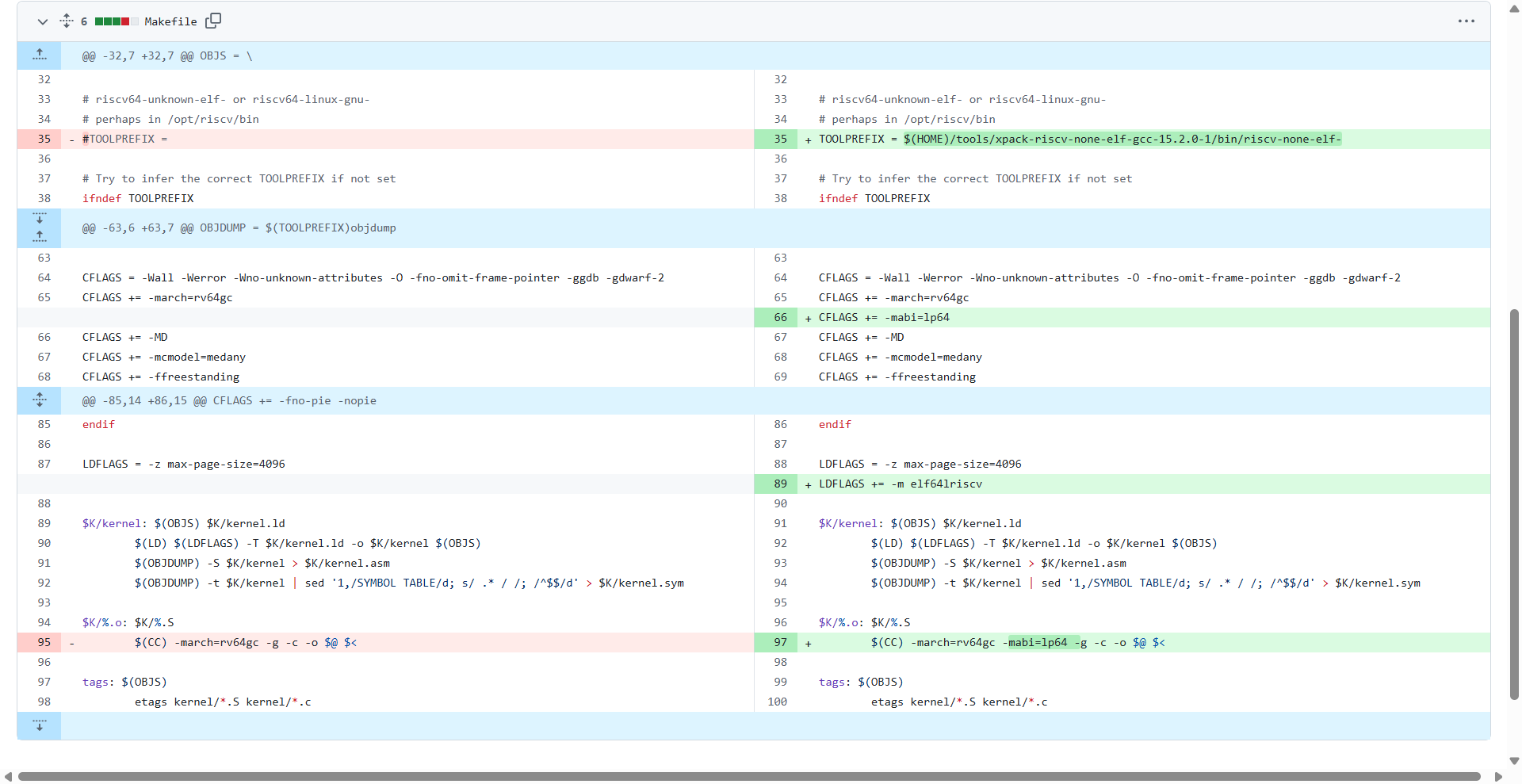
After these changes, xv6 compiles and runs successfully on qemu:
$ make qemu
qemu-system-riscv64 -machine virt -bios none -kernel kernel/kernel -m 128M -smp 3 -nographic -global virtio-mmio.force-legacy=false -drive file=fs.img,if=none,format=raw,id=x0 -device virtio-blk-device,drive=x0,bus=virtio-mmio-bus.0

xv6 kernel is booting

hart 1 starting
hart 2 starting
init: starting sh
$ ls
.              1 1 1024
..             1 1 1024
README         2 2 2425
cat            2 3 38168
echo           2 4 36952
forktest       2 5 18224
grep           2 6 41736
init           2 7 37336
kill           2 8 36880
ln             2 9 36672
ls             2 10 40296
mkdir          2 11 36944
rm             2 12 36928
sh             2 13 60888
stressfs       2 14 37800
usertests      2 15 194808
grind          2 16 53448
wc             2 17 39200
zombie         2 18 36208
logstress      2 19 38960
forphan        2 20 37704
dorphan        2 21 37144
console        3 22 0
$